
The management cluster hosts centralized components that aren’t needed on every cluster, such as ArgoCD (if using GitOps), and frontends for monitoring tools like Prometheus, Grafana, and Jaeger. This is especially relevant when self-hosting these components rather than using managed services.Documentation Index
Fetch the complete documentation index at: https://docs.skyhook.io/llms.txt
Use this file to discover all available pages before exploring further.
Why Use a Management Cluster?
Separating management components from workload clusters reduces the risk of disruption to either production workloads or the supporting tools. Best practices recommend a dedicated management cluster, though Skyhook doesn’t technically prevent you from designating any cluster as your management cluster. Benefits of a dedicated management cluster:- Isolation: Keep management tools separate from production workloads
- Access control: Simplify permissions management for centralized services
- Reliability: Prevent resource contention between apps and management tools
- Scalability: Size the cluster specifically for management workloads
Configuring Your Management Cluster
Navigate to Organization Settings > Management Cluster to designate which cluster hosts your centralized components.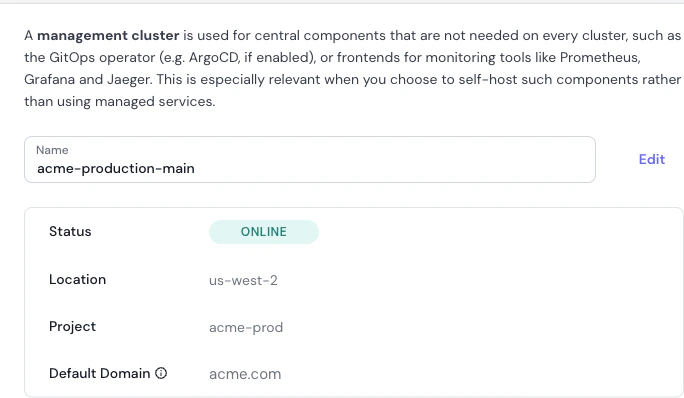
- Click Select Cluster
- Choose a cluster from your connected clusters
- Optionally configure the default domain
Management Cluster Details
Once configured, you’ll see the following information:-
Name: The name of your management cluster (e.g.,
acme-production-main). This field is editable. -
Status: Current operational status of the cluster. Common statuses:
- ONLINE: Cluster is actively running and accessible
- OFFLINE: Cluster is not reachable
- DEGRADED: Cluster has issues but is partially operational
-
Location: The cloud region where the management cluster is hosted (e.g.,
us-west-2,eu-west-1). Important for understanding data residency and latency. -
Project: The cloud project or account the cluster belongs to (e.g.,
acme-prod). Helps segregate and organize resources across multiple projects. -
Default Domain: The default domain for centralized services (e.g.,
acme.com). When you configure tools like Grafana or ArgoCD with an Ingress, Skyhook uses this domain by default. For example, ArgoCD might be accessible atargocd.acme.com.
Addons
This section lists the additional components or “addons” that have been installed on the management cluster to extend its functionality. Examples include:- ArgoCD: ArgoCD is a declarative, GitOps continuous delivery tool for Kubernetes.
- Cert Manager: Ensures the management cluster has capabilities for automating the management and issuance of TLS certificates.
- External Secrets Operator: Facilitates integrating external secret management systems (e.g., AWS Secrets Manager, Azure Key Vault) with the Kubernetes cluster, enabling secure and centralized management of sensitive information.